Payroll Service Providers for Small Business: A Complete Guide
Running a small business involves more than selling products or providing services. Business owners must also manage employee salaries, tax deductions, payment schedules, and payroll records. Handling these responsibilities manually can take valuable time and increase the risk of mistakes.
This is why many companies choose payroll service providers for small business. These providers help businesses calculate employee wages, process payments, manage payroll records, and handle various payroll-related tax tasks.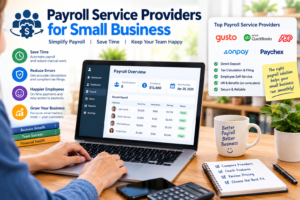
Whether you employ two people or manage a growing team, the right payroll service can make your administrative work easier. In this guide, we will explore how payroll services work, their benefits, popular providers, important features, and how to choose a solution that fits your business needs.
What Are Payroll Service Providers for Small Business?
Payroll service providers are companies that offer software or professional services to help employers manage employee compensation. Depending on the service, they may calculate wages, process direct deposits, prepare pay statements, maintain payroll records, and assist with tax calculations and filings.
For example, imagine a small retail business with eight employees. Each employee may work different hours, earn a different wage, and have different deductions. Calculating every paycheck manually can become complicated.
A payroll service can organize this information and automate many calculations, making payroll easier to manage.
Some providers offer self-service software, while others provide additional assistance from payroll specialists. The level of support depends on the provider and the subscription plan.
Why Small Businesses Need Payroll Services
Small businesses often have limited administrative resources. Business owners may handle hiring, customer service, marketing, accounting, and payroll themselves.
Using a payroll provider can reduce this workload and help create a more organized payment process.
1. Save Time on Payroll Tasks
Calculating wages, reviewing working hours, preparing pay statements, and maintaining records can take several hours each pay period.
Payroll software automates many routine calculations and organizes employee information in one place. This allows business owners to spend more time serving customers and growing their businesses.
2. Reduce Payroll Errors
Mistakes in employee hours, overtime calculations, deductions, or payment amounts can create frustration and additional work.
Payroll systems can apply configured pay rates and calculation rules consistently. However, the accuracy of the results still depends on correct employee information, suitable settings, and proper review.
Businesses should regularly check payroll reports before approving payments.
3. Simplify Payroll Tax Responsibilities
Employers in the United States may need to manage federal income tax withholding, Social Security and Medicare taxes, unemployment taxes, and applicable state or local requirements.
Many payroll providers offer tax calculation, filing, payment, and reporting services. However, these services differ between plans, and employers should confirm exactly what is included.
Using a payroll provider does not automatically remove every legal responsibility from the employer.
4. Improve Employee Satisfaction
Employees expect to receive the correct amount of pay on time. Payroll systems can help businesses establish consistent pay schedules and provide access to digital pay statements.
Some services also offer employee portals where workers can review pay history, update certain personal details, and access tax documents.
A reliable payroll process can build trust and reduce confusion about compensation.
Best Payroll Service Providers for Small Business
Several established providers offer payroll solutions for small businesses. The right choice depends on your budget, number of employees, industry, and required features.
1. Gusto
Gusto is a payroll and HR platform designed to support businesses with employee payments and related administrative tasks.
Its services may include payroll processing, tax-related features, employee onboarding, benefits administration, and digital pay statements, depending on the plan.
Gusto may be worth considering if you want payroll and basic HR functions in one platform.
2. QuickBooks Payroll
QuickBooks Payroll is an option for businesses that use QuickBooks accounting software or want payroll and accounting information to work together.
Depending on the plan, features may include payroll processing, tax calculations, direct deposit, and employee record management.
It can be particularly useful for owners who want to keep financial reporting and payroll workflows connected.
3. ADP
ADP provides payroll and workforce management services for businesses of different sizes.
Its offerings can include payroll processing, tax administration, reporting, and HR-related tools. Available features depend on the selected product and service agreement.
ADP may suit businesses that want an established payroll provider with options for expanding workforce needs.
4. OnPay
OnPay offers payroll and HR-related services for small businesses. Its platform supports payroll processing and various employee administration tasks.
Depending on the business and plan, it may help manage payroll taxes, employee records, and certain benefits-related processes.
It is worth comparing OnPay with other providers if you want payroll and HR tools without choosing an unnecessarily complex system.
5. Paychex
Paychex provides payroll, HR, and workforce management services for small and growing businesses.
Its offerings may include payroll processing, tax services, employee self-service tools, and access to additional HR support.
Businesses should compare the available service packages to understand the total cost and level of assistance included.
Important: Provider features, pricing, eligibility, and service terms can change. Review each company’s official website and current plan details before making a decision.
Essential Features to Look for in Payroll Software
Choosing payroll software based only on its price can lead to problems later. Before purchasing a plan, consider the features your business actually needs.
Automatic Payroll Calculations
The software should calculate employee wages using the information you provide, including hourly rates, salaries, approved hours, and applicable deductions.
If your employees receive overtime, commissions, bonuses, or shift-based pay, confirm that the system supports these arrangements.
Direct Deposit
Direct deposit allows employee wages to be transferred electronically to their bank accounts.
Check processing deadlines, payment options, setup requirements, and whether the provider charges additional fees for certain payment methods.
Tax Calculations and Filing
Look for features that support relevant tax calculations, filings, payments, and year-end reporting.
Confirm which responsibilities the provider handles and which require action from your business. This is especially important if you employ workers in multiple states.
Employee Self-Service
An employee portal can allow workers to access pay statements, review payroll information, and retrieve available tax documents without contacting the business owner for every request.
Accounting Integration
Integration with accounting software can help transfer payroll expenses into your financial records and reduce duplicate data entry.
Before subscribing, verify that the provider supports your current accounting platform and that the integration covers the information you need.
Security and Data Protection
Payroll records contain sensitive information, including compensation details and personal data.
Look for strong access controls, secure authentication, appropriate data protection practices, and clear policies for storing and retaining records.
How Much Do Payroll Services Cost?
Payroll service costs depend on the provider, business size, payment frequency, and features included.
Many providers use a pricing structure that combines a monthly base fee with an additional charge for each employee. Other plans may use customized pricing or include payroll within a broader HR service package.
Additional expenses can arise from tax services, benefits administration, year-end forms, contractor payments, or specialized support.
When comparing quotes, calculate the estimated total cost for your business rather than relying only on the advertised starting price.
For example, a company with five employees should compare the monthly base fee, per-employee charges, and any extra service costs before selecting a provider.
A slightly more expensive plan may offer better value if it includes features that would otherwise require separate subscriptions.
How to Choose the Right Payroll Provider
Start by determining how many employees you have and how frequently you run payroll. Consider whether your workers are salaried, hourly, or independent contractors.
Next, identify your main priorities. If you already use accounting software, integration may be essential. If you operate across multiple states, look for suitable multistate payroll capabilities.
Compare at least a few providers and review their customer support, setup process, reporting features, and service limitations.
It is also useful to ask about implementation assistance, data migration, cancellation policies, and how payroll problems are handled.
If available, use a demonstration or trial to understand the interface before committing to a subscription.
Finally, consider your future plans. A system that works for three employees today should ideally remain practical if your business expands to fifteen or thirty employees.
Common Payroll Mistakes Small Businesses Should Avoid
One common mistake is entering incorrect employee information. Errors in pay rates, working hours, or tax details can affect the final paycheck.
Another mistake is missing payroll deadlines. Businesses should establish a clear schedule for collecting timesheets, reviewing payroll, approving payments, and submitting required tax information.
Failing to maintain organized records can also create difficulties during audits or when answering employee questions.
Finally, employers should not assume that payroll software automatically handles every legal requirement. Review reports, keep employee records current, and verify applicable federal, state, and local obligations.
Conclusion
Choosing the right payroll service provider for a small business can make employee payments more organized and reduce the time spent on routine administrative tasks. From automatic wage calculations and direct deposits to payroll reporting and tax-related services, the right platform can support more efficient business operations.
Gusto, QuickBooks Payroll, ADP, OnPay, and Paychex are useful providers to compare, but the best option depends on your company’s specific requirements and budget.
Before making a decision, review pricing, available features, customer support, integrations, and tax-service responsibilities. A carefully selected payroll system can help your business pay employees accurately, maintain better records, and prepare for future growth.